I've just upgraded to WordPress 2.6. Leave a comment if you see any problems.
Closed captions on Comcast DVR via HDMI
[Updated June 2013] Good news, it's much easier to turn on closed captions on my Comcast DVR manufactured by Motorola (picture) because of a recent update to the Comcast DVR software. I can now turn captions on/off from the "regular menus" (no need to turn the cable box on & off). Here's how it works for me now:

- Turn on your TV and the Comcast box
- Press the Menu button twice on the Comcast remote (or on the box)
- In the on-screen menu, choose the "Setup" button (using the arrows and Ok button on the remote or box)
- Then choose the "Closed Captioning Setup"
- You'll see a setting for "Closed Caption", which you can change between off & on by using the left & right arrow on the remote (or box)
If your box does not have the menus seen above, you'll have to use my older instructions below (after the break) until your box is updated.
FYI, you still cannot use your TV remote closed captions button when your DVR is connected to your TV with HDMI and component connections. Read below for more details.
[My original post from 2008, kept for posterity] Last weekend I lost a few hours trying to get closed caption to display with my Comcast DVR connected to my TV with an HDMI cable. I like to temporarily turn on captions when trying to figure out what someone said, or if there's a lot of background noise. But the closed captions button on my TVs remote did not seem to work.
If your box still has the old software (you've tried the instructions above and they don't work), here's a quick cheat sheet for enabling closed captions on the Comcast DVR manufactured by Motorola (picture). You can use either the buttons on the remote, or on the front of the DVR:
- Turn on your TV
- Turn off the DVR
- Press the Menu button, on the Comcast remote (or on the Comcast box)
- You will see the USER SETTING screen on your TV
- Move down to the CLOSED CAPTIONS entry using the arrow buttons
- Press the right-arrow to switch between ENABLED and DISABLED
- Press the Menu button
- Turn on the DVR
The problem was not with my TV or the DVR. The problem is that HDMI and component connections cannot carry closed captions for the TV to decode. This was the first time I've connected a TV using HDMI or component cables, so I never ran into this closed caption issue before. If you connect any device (Comcast's DVR, Tivo, etc) by HDMI/component, you must use that device's menu to decode the closed captions — your TV's closed caption button will never show captions when connected this way. You can read more about this limitation of HDMI and component on the HDTV interoperability issues section on the main Wikipedia page for closed captions.
I called Comcast to get help, and talked with a support person who tried very hard, and ultimately directed me to the "hidden" setup menu on the DVR to enable closed captions (see above). But it was pretty bumpy, and Comcast never said that it was a limitation of HDMI/component.
Also, the Comcast DVR makes it very hard to quickly toggle captions on/off, because you must turn off the DVR every time you want to change the setting. My guess is that the DVR engineers assumed that only deaf people would want captions, and leave them on all the time.
See How to use a Motorola DVR for a nearly complete manual on many of Comcast's Motorola DVRs. I updated the "Closed Captions" section to clarify the limitations of HDMI and component connections.
Promising e-book device
Plastic Logic recently demonstrated their e-reader device at the DemoFall conference. Unlike the other e-readers on the market (like the Amazon Kindle), Plastic Logic's device is all plastic, and has no glass that can break. They claim it will weigh less than a pound, the battery will last for days, and that it will have input/markup features so it's more than just a reader.
At this point they are not available for sale. But they do have a factory in Germany so they should be closer to production than if it were just a prototype coming out of the lab.
The Plastic Logic home page currently has a video of the CEO demonstrating their device.
Harrassment does not improve Security
Most of the changes you see at airports since 9/11 do very little to improve security, considering the cost and hassle. Take for example having to show ID — most of the 9/11 hijackers had perfectly valid US-issued IDs, and were not on any list. Or the futility of the TSA's belief that their watch list (which contains hundreds of thousands of names) will catch terrorists. Once again, most of the 9/11 hijackers weren't on any watch list, and even if they were they simply would have used different names. All the watch list accomplishes is to delay a 4-year old from boarding the plane with his parents.
Amos Shapir made a sad but true observation on the RISKS mailing list:
The newly formed U.S. TSA has a serious problem: they have to supply Security, but they have no idea how (and it seems that they are unaware that nobody else does, either). But they do know that Security causes Harassment, and they do know how to do Harassment. So the obvious logic is, the more Harassment they'd do, the more Security will be produced. QED
Science makes your voice deeper
Similar to the way that helium makes your voice higher, there is a gas that can make your voice lower. It's called sulfur hexafluoride. Adam Savage from Mythbusters demonstrates in the video below:
(via John Ahrens)
Win XP crashes solved by disabling Nvidia Driver service
I finally solved a long-standing problem with my Windows XP laptop.
My CPU would slowly grow to about 15% even when idle. Then a window would pop-up telling me I had 60 seconds to reboot because an RPC service had crashed. This occurred about once a week. Often enough to be annoying, but not often enough to make me dig to find the problem. The crashed "RPC service" was not very instructive, because it's a service used by lots of programs. So clearly some software running on my computer was "abusing" this service.
At first I thought it may have been due to the Intel PROSet/Wireless software running on my computer that was doing something bad with RPC, it turns out the problem was with Nvidia driver software for my Nvidia graphics card. The problems were on my Asus A8JS laptop, under XP Pro SP2 & SP3, with an Nvidia GeForce Go 7700 graphics card, and Nvidia Forceware 163.44 drivers, with DirectX 9.0c.
I found the solution here:
http://forum.notebookreview.com/showthread.php?p=3076277#post3076277
I had to disable the Nvidia Driver service (see detailed instructions below). After that, I've not had any of the symptoms.
This describes the exact symptoms I was seeing (including the 1 minute to reboot):
http://www.notebookforums.com/thread212236.html
Apparently, you can shutdown the Nvidia Driver helper without much consequences. There may be some multi-monitor stuff that doesn't work, but you can always start it manually, or re-enable it to start automatically.
http://www.glaryutilities.com/processlibrary/process/nvsvc32.exe.html
Read on for detailed instructions…
Wise man vs. expert
I like this unattributed quote:
An expert is someone who has made all the possible mistakes in a narrow field. A wise man is one who has made them widely.
(Edited: Oops, first version ended with "wisely" rather than "widely". Now fixed. We now return you to your regular programming)
"In the Shadow of the Moon"
Just watched a fantastic documentary In the Shadow of the Moon from 2006. It's a 1 hr 40 min documentary interview with ten of the Apollo astronauts. There's no narrator, just the astronauts and historical footage. The focus is their view of the overall experience, not so much the details. (watch the miniseries From the Earth to the Moon for lots of the details)
Be sure to watch through the closing credits, where the astronauts give their views on the persistent hoax theories that we did not land actually land on the Moon. I liked Charlie Duke's comment, "We've been to the Moon nine times. I mean, why did we fake it nine times if we faked it?"
All these men were interesting, but the real treat was Michael Collins' comments. He was the astronaut who stayed in orbit around the Moon while Neil and Buzz became the first men to walk on the Moon. Collins was simply spoken, animated, and funny in an understated way. Below are of some of the things Collins said in the movie:
On the day of the launch, as they got out of the van at the pad to walk to the elevator:
When you get out to the base of this gigantic gantry, it's … it's empty, there's nobody there, it's deserted. And you're accustomed to scores of workers, swarming like ants all up and down and around it, and you're in a crowd of people. And then suddenly, there's nobody there and you think, "God, you know, maybe they know something I don't know!"
FactCheck.org clears muddy election waters
As the Obama and McCain camps start slinging the mud, FactCheck.org once again rises to the occasion. FactCheck is a non-partisan, non-profit organization that analyzes political claims. They provide both short summaries, and in-depth detail. You can subscribe for email alerts, or subscribe to their RSS feed.
Spot the speeder
Automatic speeding cameras sound good on paper — automatically catch the speeders and send them a ticket via mail, without tying up police officers. But even with people in the loop, you get problems like this hatchback "driver" in South Africa who was ticketed for exceeding the 60 km/h limit:
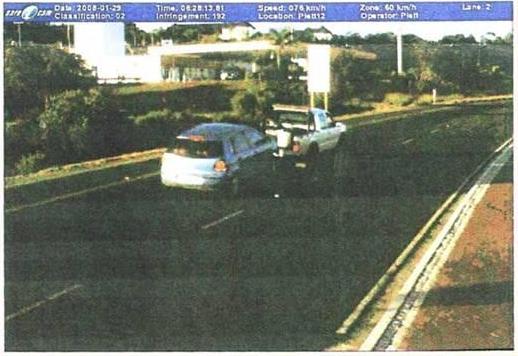
You can read more at http://thedailywtf.com/Articles/Traffic-Enfarcement-Camera.aspx
One commenter said the "speeder" should consider himself lucky that he was not also ticketed for tailgating.