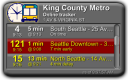
I've written a Yahoo! widget that lets you watch buses arriving at a specific stop in Seattle and throughout King County Metro. This widget gives you a more focused view into the same data available on Metro's Tracker Location View web page.
After installing the widget, you use the Widget Preferences pop-up to choose a location to watch, and optionally limit the buses and destinations. You can also customize the text & background colors for buses running on-time, late, or early.
King County Metro tracks the location of all it's buses. The widget gets real-time data from a web service provided by a Univ of Washington ITS Research project.
I had been using the Seattle MyBus Watcher widget, but that stopped working when Yahoo! released the latest Widgets 4.5 environment in early 2008. I'd had some minor complaints about that widget, and since it no longer worked, I decided to write my own.
Widget works one day, not the next. Stop is 3rd & Seneca. Busses are the 28 and the 5.
Any way to have it check two stops?
And also – really nice work! Is the source code available?
Ben: The widget depends on the data coming from Metro. On my stop, occasionally some buses aren't transmitting, so they don't appear in the feed, and so the widget shows nothing. Unlike the "real" King County Metro Site, my widget doesn't have the full schedules, so it can't show "missing" buses.
No way currently to check multiple stops. I've thought about doing that, but never got around to it.
As for the source code, it's included in the widget. Under windows, if you go to "My Documents"/"My Widgets", you will see a .widget file. If you make a copy, then rename it to a .zip, you can look inside. You'll probably need to read Yahoo's developer documentation on Widgets in general to really understand the code: http://widgets.yahoo.com/tools/
Loved the widget. It stopped working a week ago (on both home and work PCs). Now says "Error! (403)" in red font in the lower right corner.
I'm seeing the 403 as well, started getting it about the same time as you. 403 is a general "forbidden" reply from a server.
Is it possible Metro changed the address for querying bus traffic? Or maybe they were getting too many hits from people who have the widget?
Keith and Scott: Hang tight on the 403 errors. I'd don't think they've changed the address, because that would be more like a 404. I've seen this in the past, where Metro is having trouble with their servers. They eventually clear up the problem.
I've recently moved to Colorado, and no longer use this widget, so fixing it is a little lower on my priority list. I'll take a look again next week if the 403 errors are still occurring.
Working again as of Tue 8/19. Best!
I'm new to this widget…but I can't get it to display any information for route 44 going to Ballard. Any information?
Start up the widget. Right-click and choose "Widget Preferences" from the pop-up menu. In the "Route Number" field enter 44 for your bus number. Next, you need to choose from the "Location" menu. You must choose a location that bus 44 actually runs past. If you choose a location not served by 44 you will never see any data.
To find locations served by bus 44, go to http://trackerloc.kingcounty.gov/ and enter 44. Then look at the stops, and choose one on the widget. Then "Save" button. You should see data. If you don't see data, double-check the "Location" on the widget preferences against the location you saw for 44 at http://trackerloc.kingcounty.gov/.
I used location "15 Ave NE & NE 43 ST" with route 44, and the widget shows data. Here's what you should see on your widget preferences:
Also, be sure the "Destinations" field on the widget preferences is empty to start. Once you see data, you can use the "Destinations" to filter what you see. The widget shows buses going in both directions, so you can use the "Destination" on the widget preference to filter the buses going towards the destination you are interested in.